Simple digital book creation platform
Book Creator is a well-known digital publishing platform designed to help educators, students, and creators build interactive books with minimal friction. On Windows, Book Creator is accessed primarily through its web-based experience rather than a fully featured native app, ensuring broad compatibility across devices. This approach keeps the learning curve low while maintaining consistency with other platforms, making Book Creator suitable for classrooms, collaborative projects, and personal storytelling where ease of use and accessibility matter most.
Top Recommended Alternative

Core creation tools and platform approach
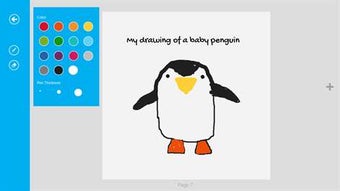
Book Creator focuses on combining text, images, audio, and video into structured digital books, and this full feature set is available through the web platform on Windows. Book Creator emphasizes simplicity, allowing users to add content, arrange pages, and record media directly within the editor. This design supports creative expression without relying on complex publishing software, making Book Creator practical for educational settings where time, clarity, and accessibility are priorities.
Beyond basic layout tools, Book Creator supports exporting books in common formats and sharing them digitally, which is central to its role as a publishing platform. On Windows, Book Creator benefits from browser-based access, meaning updates and improvements apply automatically without manual installs. Collaboration tools and cloud-based libraries further position Book Creator as a platform rather than a single-device app, aligning Windows users with the same workflow available on other supported systems.
Final thoughts
Book Creator works best when viewed as a cross-platform digital book creation ecosystem with reliable Windows support through its web interface. While older standalone Windows apps were more limited, the current platform offers a broader, more capable experience for multimedia publishing and classroom collaboration. Book Creator remains a strong option for users who value simplicity, accessibility, and consistent features across devices, especially in educational and structured content-creation scenarios.